Skip to content

NUMEO MCP

Your freight,
now in ChatGPT.

Find loads. Understand rates. Know who you're working with. Bring your Numeo account into ChatGPT and get answers without switching tabs.

WORKS WITH
ChatGPTClaudeOther MCP clients
ChatGPT × Numeo
What’s the dry van market rate from Atlanta to Chicago?
Recorded Numeo market rates and historical trend in ChatGPT
From a real Numeo sessionWatch it happen
Live load searchMarket intelligenceBroker checksTMS load lookupAccount information

WHAT YOU CAN ASK

The right information.
Right where you're thinking.

Start with a question. Follow up with another. Numeo brings the freight data into the conversation.

FIND FREIGHT

A load search that starts
with what you need.

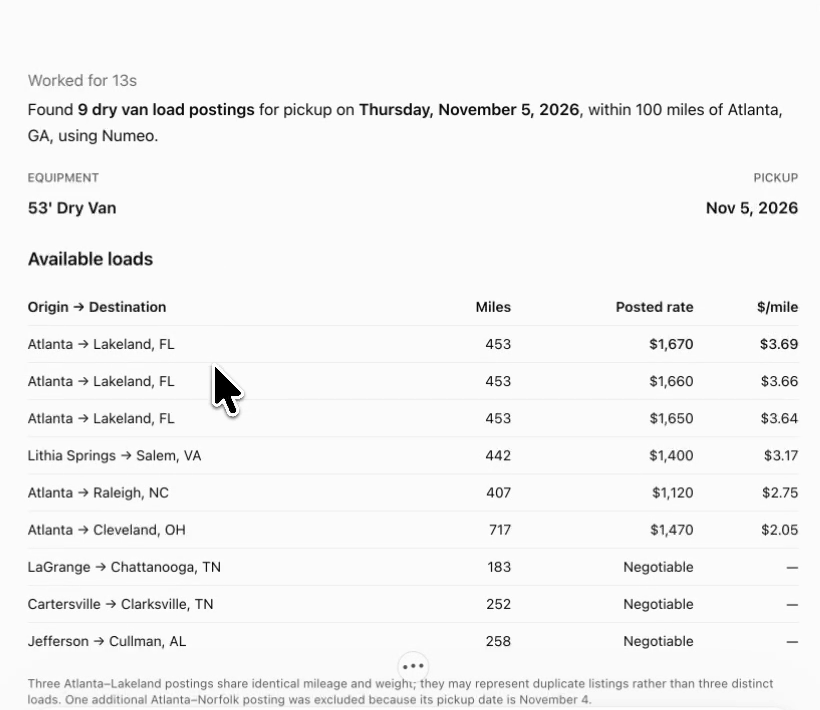
Give your route, equipment and pickup date. See the returned loads, miles, posted rates and broker details together.

Actual Numeo search in ChatGPT showing Atlanta dry van loads, mileage and posted rates

Actual ChatGPT session · November 4, 2026

UNDERSTAND THE MARKET

Put a posted rate
in perspective.

See a lane's median, typical range and supporting observations. Then ask how a returned load compares.

Actual Numeo Market Intel response showing Atlanta to Chicago median rates, sample size and historical trend

Recorded market snapshot · Rates and listings change

CHECK BROKERS

Know more before you call.

Look up authority information, risk signals and available factoring credit verdicts by MC number or email.

Check broker MC 175953.
LOOK UP TMS LOADS

Your booked freight, at hand.

Pull up your company's booked loads and review available details from your connected Numeo TMS.

Show my upcoming TMS loads.
VIEW YOUR ACCOUNT

Know which account is connected.

Check your connected company, signed-in user and available MC and DOT numbers.

Show my Numeo account profile.

SEE IT FOR YOURSELF

One conversation.
Real Numeo answers.

Follow a real ChatGPT session from load search to market comparison, then see what else the connection can do.

Recorded in ChatGPT · 3 min 02 secOpen recording

CONNECT

A new place to work.
The same Numeo.

Connect once, sign in to your Numeo account, and start asking. Your existing account access determines what's available.

Sign in through Numeo. Review the access request before connecting.
Need a hand connecting?
  1. 1

    Open your assistant's connections

    Open ChatGPT’s app or connector settings and choose the option to add a custom MCP connection.

  2. 2

    Add the Numeo server

    Give the connection a name, then paste this address.

  3. 3

    Sign in. Then ask away.

    Sign in to Numeo, review the connection request, and try: “Find dry van loads out of Atlanta for tomorrow.”

Custom connections may require specific assistant plans or settings. Get setup help

FAQ

A few answers
before you connect.

What is Numeo MCP?

It connects your Numeo account to an AI assistant that supports the Model Context Protocol. You ask in plain English, and the assistant uses Numeo to look up freight and account information.

Do I need a Numeo account?

Yes. You sign in to Numeo when you connect. The features and data available to your assistant depend on your account, permissions, connected services and plan limits.

Where do the loads and market rates come from?

Load search uses the services connected to your Numeo account. Market Intel uses Numeo’s own observed load data. Coverage varies, and some lanes have too little data to report a rate.

Can it book a load or buy insurance?

The connection demonstrated here searches and reads information. Finding a listing does not book it, and a broker check does not guarantee safety or payment. Insurance purchases are not supported.

Which assistants can I use?

The walkthrough on this page uses ChatGPT. Other assistants with remote MCP and compatible OAuth support can connect using the same server address. Setup and feature availability can vary by assistant.

READY WHEN YOU ARE

Bring Numeo into
your next conversation.

Connect Numeo