Skip to content
Skip to content
Back to blog
ProductMay 21, 202612 min readNumeo Team

Introducing Load Radar

Load Radar monitors your preferred lanes across DAT, Truckstop, and connected broker portals, alerting your phone the moment matching freight posts.

Product

Introducing Load Radar

Introducing Load Radar

Introduction

In freight dispatching, timely access to load opportunities is critical to operational efficiency and profitability. Dispatchers routinely search multiple load boards to find loads that fit their fleet’s lanes, equipment, and rate requirements. However, this process often involves repeatedly refreshing load boards to catch new postings, a task that is both time-consuming and prone to missed opportunities, especially on lanes where top loads book within seconds of posting.

Load Radar, part of the Numeo Load Hub suite, addresses this operational challenge by continuously monitoring saved searches across more than 15 connected load boards and broker portals. It automatically alerts dispatchers via phone call or Telegram message the moment a load matching their specified lane, rate floor, and other criteria appears. This system reduces the need for manual refreshes and enables dispatchers to act promptly on high-value loads.

This post provides a detailed overview of Load Radar’s functionality, workflow, operational context, user controls, and implementation considerations. It aims to clarify what Load Radar does, how it fits into a dispatcher’s workflow, and the boundaries of its capabilities.

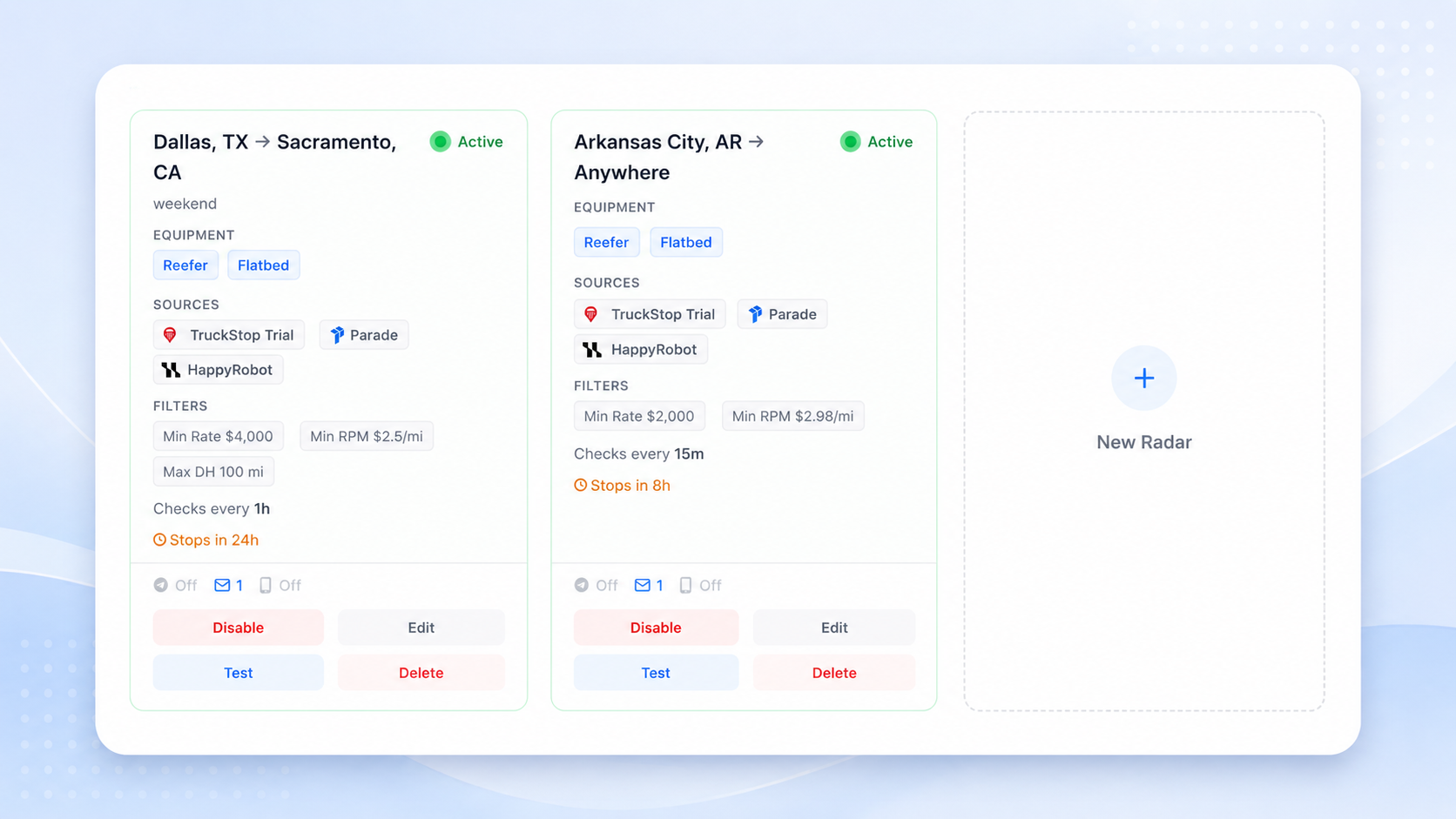
Load Radar — real-time lane alerts when freight matches your saved search


What Load Radar Does

Load Radar is designed to automate the monitoring of load boards for dispatchers by continuously running saved searches across all connected load sources. These sources include major public and private load boards such as DAT, Truckstop, RXO, J.B. Hunt, C.H. Robinson, Arrive Logistics, Spot Freight, and others — totaling over 15 integrated platforms.

Detailed Workflow Narrative

  1. Setup Saved Searches:
    Dispatchers begin by creating and saving search queries within Load Hub. These queries define operational parameters including lanes (origin and destination regions or specific locations), equipment types (van, reefer, flatbed, etc.), minimum acceptable rates (rate floors), mileage limits, deadhead tolerances, and other relevant criteria such as broker preferences or load types (partial/full). This step is critical because the quality and specificity of saved searches directly impact the relevance and volume of alerts generated.

  2. Continuous Monitoring:
    Once saved, Load Radar continuously executes these searches across all connected load boards and broker portals linked to the dispatcher’s existing accounts. Unlike manual searches, this process runs in the background without user intervention, polling or listening for new load postings that match the saved criteria. This continuous operation is designed to minimize latency between load posting and dispatcher notification.

  3. Real-Time Alerts:
    When a new load listing appears on any connected board that matches the saved search criteria — including lane and rate floor — Load Radar immediately sends an alert. Notifications are delivered either by phone call or via Telegram message, depending on user preference. The alert includes essential load details and, when possible, a direct link to view the load in Load Hub for quick action.

  4. First-Mover Advantage:
    By receiving instant alerts, dispatchers gain a timing advantage on lanes where the best loads often book within 60 seconds of posting. This reduces the risk of missing profitable loads due to delayed manual refreshes and allows dispatchers to prioritize outreach or negotiation efforts promptly.

  5. Action on Alerts:
    Upon receiving an alert, dispatchers can review the load details and proceed with booking or negotiation using their existing tools and workflows. Load Radar does not automate booking or negotiation but serves as an early warning system to improve dispatcher responsiveness.

Key Features Summary

  • Cross-Board Monitoring: Simultaneous search and monitoring across 15+ load boards and broker portals.
  • Saved Search Persistence: Supports multiple saved searches tailored to different lanes, equipment, and rate criteria.
  • Notification Channels: Alerts via phone call or Telegram to suit dispatcher preferences.
  • Rate Floor Enforcement: Filters out loads below the minimum acceptable rate, ensuring alerts are relevant.
  • Lane and Criteria Matching: Matches loads based on user-defined geographic lanes and additional parameters.
  • Integration with Existing Accounts: Uses dispatcher-provided credentials to access load boards without requiring new subscriptions.

Why Load Radar Matters in Dispatch and Carrier Operations

The freight brokerage and dispatch industry is characterized by rapid load turnover and intense competition. Dispatchers must act quickly to secure the best loads, but manual monitoring of multiple load boards is inefficient and prone to human error. Load Radar addresses several operational pain points that are common in dispatch and carrier operations:

Reducing Manual Effort and Cognitive Load

Dispatchers traditionally spend significant time refreshing multiple load boards to catch new postings. This repetitive task is not only tedious but also distracts from higher-value activities such as carrier communication, load negotiation, and route planning. Load Radar automates this monitoring, freeing dispatchers to focus on decision-making rather than data gathering.

Improving Responsiveness and Booking Success

In many freight lanes, especially high-demand or high-revenue routes, loads can be booked within seconds of posting. Manual refresh cycles often lag behind, causing dispatchers to miss prime opportunities. Load Radar’s real-time alerts enable dispatchers to respond immediately, increasing the likelihood of securing profitable loads.

Supporting Profitability Through Filtering

By enforcing rate floors and lane criteria, Load Radar helps dispatchers focus on loads that meet their profitability thresholds. This reduces time wasted on low-margin or unsuitable loads and supports better margin management across the fleet.

Seamless Integration with Existing Systems

Load Radar works with dispatchers’ current load board subscriptions and broker credentials, avoiding disruptions or additional subscription costs. This integration respects existing workflows and data access methods, making adoption straightforward.

Scalability Across Fleet Sizes and Dispatch Teams

Whether managing a small fleet with a single dispatcher or a large operation with multiple dispatchers, Load Radar supports multiple saved searches and alert configurations. This flexibility allows dispatch teams to tailor monitoring to different lanes, equipment types, or operational priorities.

Complementing Other Numeo Products

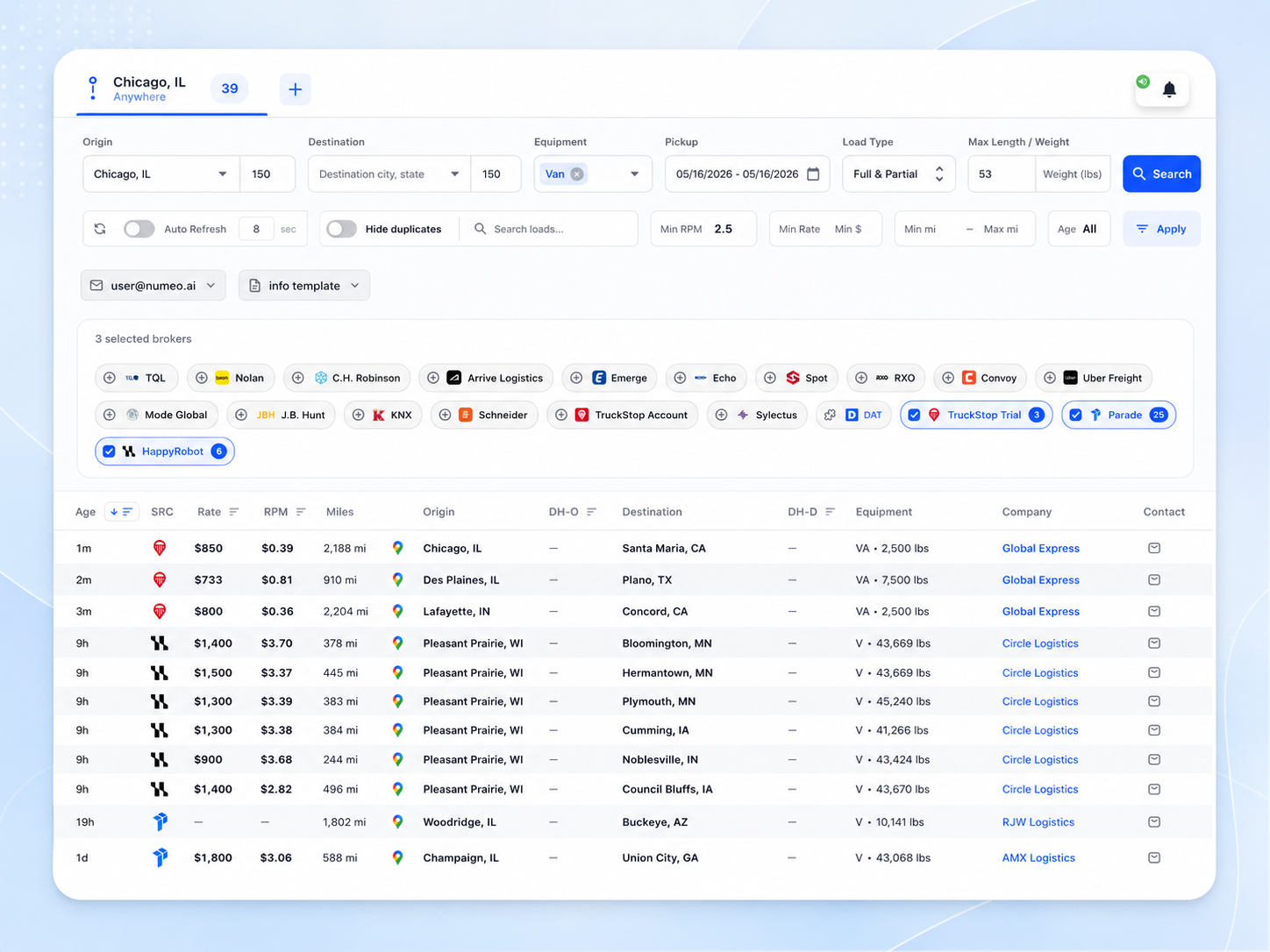
Load Radar complements other Numeo offerings such as Load Hub’s unified search interface and AI Hub’s AI-powered load finding and negotiation. Together, these tools create a more efficient and data-driven dispatch workflow.

Load Hub — search 15+ connected boards in one workflow, with Load Radar monitoring saved lanes


How Load Radar Works: Technical and Operational Details

Load Radar operates as a continuous background service within the Numeo Load Hub environment. It leverages integrations with load boards and broker portals to execute saved searches and detect new matching loads in near real-time.

Integration with Load Boards and Broker Portals

Load Radar connects to a broad set of load boards and broker portals, including but not limited to:

Load Board / Broker PortalNotes
DATRequires user subscription
TruckstopRequires user subscription
RXOIntegrated via broker portal
J.B. Hunt 360Integrated via broker portal
C.H. Robinson NavisphereIntegrated via broker portal
Arrive LogisticsIntegrated via broker portal
Spot FreightPublic load board
BeonPublic load board
EmergePublic load board
NolanBroker portal
TQLBroker portal
ConvoyPublic load board
Uber FreightPublic load board
Mode GlobalPublic load board
SchneiderBroker portal

Implementation Context:
Load Radar requires dispatchers to provide their existing credentials for these boards and portals. It does not replace or duplicate subscriptions but aggregates data from all authorized sources. This approach ensures that Load Radar respects user account boundaries and data privacy policies of each platform.

Saved Searches and Criteria Configuration

Dispatchers define saved searches specifying:

  • Lane: Origin and destination regions or specific locations. This can be defined at various geographic granularities, such as city, state, or zip code, depending on operational needs.
  • Equipment Type: Van, reefer, flatbed, or other equipment types relevant to the fleet.
  • Rate Floor: Minimum acceptable rate per mile or total load rate, set to ensure profitability.
  • Mileage and Deadhead: Maximum mileage and deadhead distance tolerances to control operational efficiency.
  • Additional Filters: Broker preferences, load type (partial or full), load weight, and other parameters.

These saved searches serve as filters that Load Radar applies continuously to incoming load postings. Dispatchers can create multiple saved searches to cover diverse operational scenarios or lanes.

Alerting Mechanism and Notification Channels

When Load Radar detects a new load that matches any saved search, it triggers an alert through one of two channels:

  • Phone Call: An automated call delivers a notification to the dispatcher’s phone. The call provides essential load details and prompts the dispatcher to take action.
  • Telegram Message: A message is sent via Telegram, providing load details and a link to view the load in Load Hub. This channel supports quick, text-based notifications that can be reviewed on mobile devices or desktops.

User-Controlled Notification Preferences:
Dispatchers select their preferred alert channel during setup and can modify these preferences at any time. Notifications can be disabled temporarily or permanently if needed, allowing dispatchers to manage alert fatigue or operational pauses.


Dispatcher Control and Boundaries of Automation

Load Radar automates monitoring and alerting but preserves dispatcher control over critical decisions and configurations:

  • Saved Search Definitions: Dispatchers create, modify, and delete saved searches to tailor monitoring to their operational needs. This control ensures that alerts remain relevant and aligned with business priorities.
  • Rate Floors and Criteria: Dispatchers set minimum acceptable rates and other filters to ensure alerts meet profitability requirements. Adjusting these parameters allows for dynamic response to market conditions.
  • Notification Preferences: Dispatchers choose their preferred alert channel (phone or Telegram) and can disable or adjust notifications as needed to manage workload.
  • Load Booking and Negotiation: Load Radar does not book or negotiate loads automatically; dispatchers retain full control over these actions using their existing tools or other Numeo products such as AI Hub.
  • Account Credentials: Dispatchers provide and manage their load board and broker portal credentials; Load Radar uses these for data access but does not alter account settings or permissions.
  • Alert Management: Dispatchers can acknowledge, dismiss, or act on alerts according to their workflow, maintaining full operational control.

This design philosophy ensures that Load Radar acts as an assistive tool rather than an autonomous system, respecting dispatcher expertise and operational judgment.


Implementation Notes and Best Practices

Account Setup and Security

  • Users must have active subscriptions and credentials for load boards and broker portals they wish to monitor.
  • Load Radar connects to these existing accounts via secure integrations within Load Hub, employing encrypted credential storage and access protocols.
  • No additional subscriptions or replacements are required, minimizing onboarding friction.
  • Dispatchers should periodically review and update credentials to maintain uninterrupted access.

Saved Search Configuration Guidance

  • Dispatchers should define saved searches carefully to balance alert volume and relevance. Overly broad searches may generate excessive alerts, while overly narrow filters risk missing opportunities.
  • Including rate floors and lane specifications helps focus alerts on profitable loads.
  • Multiple saved searches can be configured to cover different lanes, equipment types, or operational scenarios.
  • Periodic review and adjustment of saved searches are recommended to align with changing market conditions and fleet capabilities.

Notification Setup and Management

  • Dispatchers must configure their preferred notification method during initial setup.
  • Phone alerts require a verified phone number capable of receiving automated calls.
  • Telegram alerts require linking a Telegram account to Load Radar, which involves authorizing Load Radar’s bot or integration.
  • Dispatchers can modify notification preferences at any time to accommodate operational changes or personal preferences.
  • Alert volume management is important to prevent notification fatigue; dispatchers should adjust saved search specificity accordingly.

Operational Considerations and Caveats

  • Load Radar is designed for continuous operation; users should ensure stable network connectivity and device availability to receive alerts promptly.
  • Alerts are triggered only for new load postings matching saved searches; existing loads at the time of setup will not generate alerts.
  • The system does not guarantee load availability or booking success; it provides timely notifications to enable dispatcher action.
  • Load Radar depends on the availability and responsiveness of connected load boards and broker portals; outages or API changes on those platforms may affect monitoring.
  • Load postings that do not appear on integrated boards will not be detected.
  • Load Radar does not perform load booking, negotiation, or rate optimization; these remain dispatcher responsibilities or are handled by other tools.
  • Dispatchers should maintain manual oversight and validation of load details before committing to bookings.

FAQ

Q1: What is Load Radar?
Load Radar is a monitoring tool within Numeo Load Hub that continuously runs saved searches across connected load boards and broker portals, alerting dispatchers by phone or Telegram when new loads match their specified lane, rate floor, and criteria[^1].

Q2: Does Load Radar replace my existing load board subscriptions?
No. Load Radar connects to your existing load board and broker portal accounts using your current credentials. It aggregates data but does not replace or cancel your subscriptions[^1].

Q3: Which load boards does Load Radar monitor?
Load Radar monitors over 15 sources, including DAT, Truckstop, RXO, J.B. Hunt 360, C.H. Robinson Navisphere, Arrive Logistics, Spot Freight, and others. New integrations are added regularly based on carrier demand[^1].

Q4: How are alerts delivered?
Alerts are sent via automated phone calls or Telegram messages, depending on dispatcher preference. These notifications occur immediately when a matching load is detected[^1].

Q5: Can Load Radar book or negotiate loads automatically?
No. Load Radar only monitors and alerts. Booking and negotiation remain manual processes controlled by the dispatcher or can be handled separately by AI Hub if used[^1].

Q6: How do I control what loads generate alerts?
Dispatchers define saved searches with specific lanes, equipment, rate floors, and other criteria. Only loads matching these saved searches trigger alerts[^1].

Q7: Does Load Radar guarantee that I will get the load?
No. Load Radar provides timely alerts to improve your chances but does not guarantee load availability or booking success[^1].

Q8: Is Load Radar included with Load Hub?
Yes. Load Radar is included in every Ultra plan alongside Load Hub, AI Hub, and three months of Numeo One TMS[^1].

Q9: What happens if a load board or broker portal changes its API or access method?
Load Radar relies on integrations with load boards and broker portals. If these platforms change their API or access methods, Load Radar’s ability to monitor may be temporarily affected until updates are implemented. Numeo monitors such changes and updates integrations proactively.

Q10: Can I pause or disable Load Radar alerts temporarily?
Yes. Dispatchers can disable alerts or pause monitoring for specific saved searches or overall, allowing flexibility during operational downtimes or when managing alert volume.

Q11: How does Load Radar handle duplicate load postings across multiple boards?
Load Radar applies de-duplication logic to minimize duplicate alerts for the same load posted on multiple boards. However, exact duplication detection depends on load identifiers and posting details.


Conclusion

Load Radar offers a practical solution to a common operational challenge faced by freight dispatchers: the need to monitor multiple load boards continuously for profitable loads. By automating saved search monitoring and delivering instant alerts via phone or Telegram, Load Radar reduces manual effort and improves dispatcher responsiveness.

While Load Radar does not replace dispatcher judgment or booking workflows, it integrates seamlessly with existing load board subscriptions and complements other Numeo products. It is particularly valuable on lanes where loads book rapidly, providing a first-mover advantage without the inefficiency of constant manual refreshing.

By preserving dispatcher control over saved searches, alert preferences, and booking decisions, Load Radar enhances operational efficiency while respecting the expertise and autonomy of dispatch teams.


From repeated refreshing to monitored intent

Load Radar addresses a specific behavior that every dispatch team recognizes: refreshing the same searches over and over. The dispatcher is not doing this because refreshing is productive work. The dispatcher is doing it because timing matters. For some lanes, the best available load can be taken quickly after it appears, and a dispatcher who checks the board five minutes later may only see the leftovers. Numeo’s Load Hub page describes Load Radar as a monitor for saved searches across connected boards that alerts the team when a load matches the lane, rate floor, and other criteria.

The concept is simple, but the implication is important. A saved search is not merely a convenience feature. It is a structured expression of the carrier’s intent: equipment type, origin and destination pattern, rate expectations, deadhead tolerance, and other operating constraints. Load Radar turns that intent into a watch process. Instead of asking a person to repeatedly check whether the market has produced a matching load, the system watches for matches and sends a phone or Telegram notification when the criteria are met.

That does not remove the need for judgment. A notification is not the same thing as a booking. The dispatcher still needs to evaluate whether the load fits the driver, hours, appointment windows, and carrier preference. But Load Radar changes the dispatcher’s starting point. The person begins with a qualified signal rather than a blank board. That difference is especially useful for teams that run repeat lanes, maintain rate floors, or have trucks becoming available at predictable times.

Load Radar should be positioned separately from Load Hub even though both live on the same product page. Load Hub is where a dispatcher actively searches. Load Radar is what continues watching when the dispatcher is doing something else. That distinction makes the product easier to understand and avoids overstating the feature. It is not a general alerting gimmick; it is a persistent monitor for freight that matches specific commercial criteria across connected sources.

Try Numeo

Ready to find better loads?

Numeo automates load search, rate negotiation, and broker emails — so you spend more time moving freight.